7 Best Calorie Tracking Apps in 2026 (Free and Paid)
We compared 7 calorie apps on AI logging taps, simplicity, price, ads and database size. See the best paid app and the best free calorie counter.
 Greg, Cal Clark team14 min read
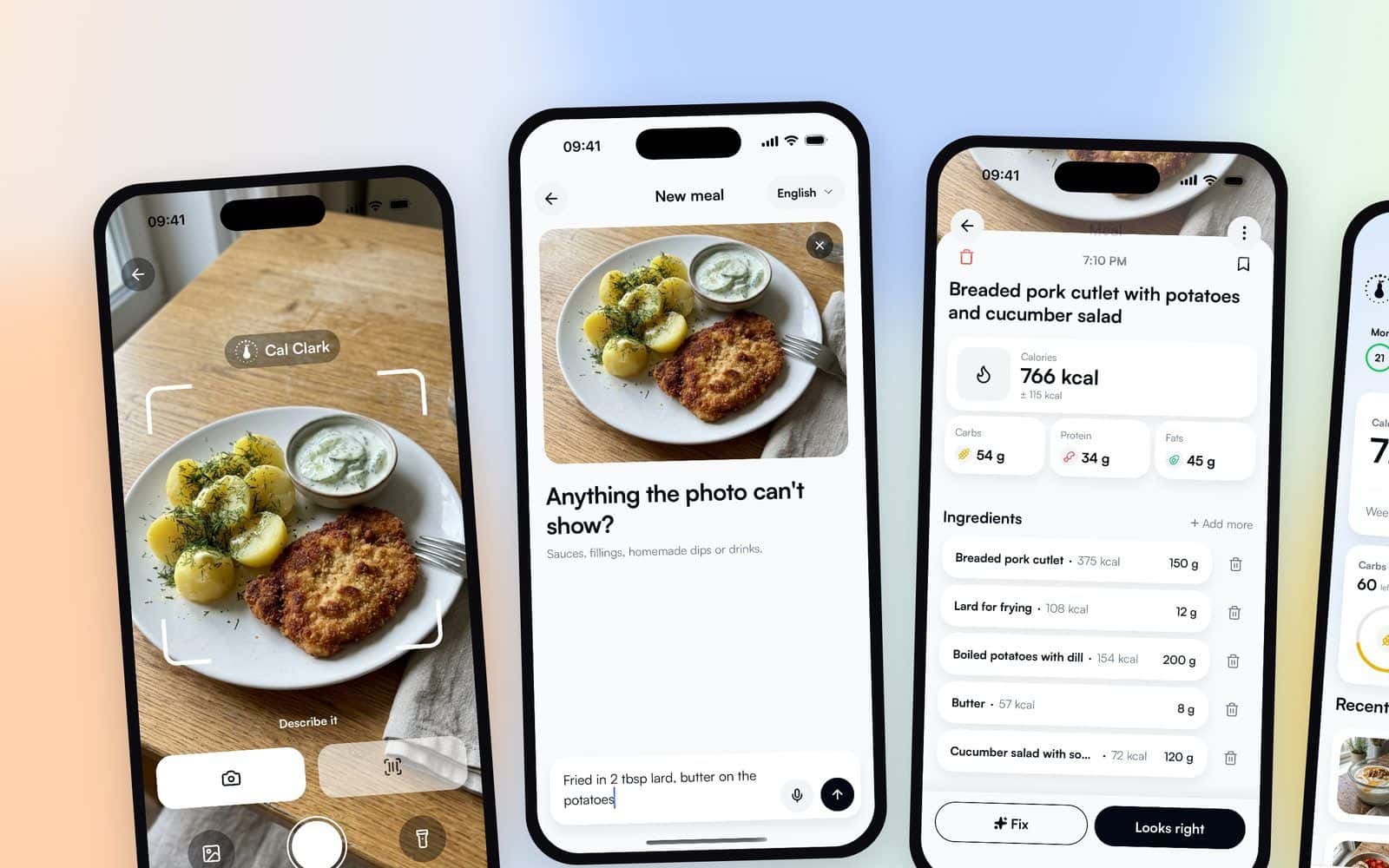
The best calorie tracking app depends on one question: will you pay for it? If you will, Cal Clark scored highest of the 7 paid apps we compared: it takes 4 taps to log a meal with AI, has the fewest features outside food logging and costs the least per year. If you will not pay, fatsecret is free and includes a barcode scanner. We checked every price and App Store rating on November 3, 2026. Cal Clark is our app, so the scoring method is below for you to check.
Key takeaways
- The best free app and the best paid app are different apps: Cal Clark has no free plan.
- Cal Clark leads the paid list on speed, simplicity and price. Lose It! and MyFitnessPal have far bigger food databases.
- No photo app is fully accurate. In a review of 52 studies, average errors of photo calorie estimates ranged from 0.10% to 38.3%.
- Free plans pay for themselves with ads. MyFitnessPal, Lose It! and Cronometer show ads until you pay.
Quick answer: which calorie tracking app should you use?
- Best paid app overall: Cal Clark. Snap or describe a meal, check it, save it. $26.99 a year in the US.
- Best paid app for detailed nutrients: Cronometer Gold, built on a curated database of 1.1 million foods.
- Best paid app for coaching: MacroFactor, which adjusts your calorie target from your weight trend.
- Best free app: fatsecret, free with a barcode scanner and no ads declared on Google Play.
- Best free app for vitamins and minerals: Cronometer Basic, if you can live with its ads.
For the steps behind a good food log, see how to track calories.
How we ranked the paid apps
Every paid app was scored on six criteria, weighted by what matters when you log food every day:
- AI meal logging speed (20%). How many taps from opening the app to a saved meal with a photo or a description. Fewer wins.
- Simplicity (20%). How many feature areas the app adds beyond logging food: fasting, meal plans, workouts, coaching, community, sleep, glucose and more. Fewer wins.
- Price (25%). The monthly and yearly price on the US App Store. Cheaper wins.
- Ads and upsells for paying users (15%). Ads after you pay, a higher tier above the paid plan, or add-ons sold in the app.
- Food database size (10%). How many foods the app says it has. Bigger wins.
- Extras (10%). One point for each of these:
- voice logging
- barcode scanning
- saved meals
- macro tracking
- water tracking
- health app sync
- a weekly calorie budget
- a logging streak
- a web app
- 4 or more languages
We weighted speed and simplicity at 40% together because a food log only works if you keep it. In a 24-week trial, people who logged their food more often lost more weight, and the time they spent logging fell over the six months.
Quick comparison: paid calorie tracking apps
| App | Taps to log with AI | Extra feature areas | Monthly | Yearly | Upsells for payers | Score |
|---|---|---|---|---|---|---|
| Cal Clark | 4 | 0 | $7.99 | $26.99 | None | 94.5 |
| Cal AI | About 3 steps | 5 | Period not shown | Period not shown | Streak Restore | 72.7 |
| MacroFactor | 6 | 3 | $11.99 | $71.99 | None found | 71.9 |
| Lifesum Premium | 5 | 5 | From $29.99 for 3 months | From $99.99 | None | 71.2 |
| Cronometer Gold | 5 | 6 | $10.99 | $59.99 | None | 70.5 |
| MyFitnessPal Premium | 5 | 7 | $19.99 | $79.99 | Premium+ tier | 58.2 |
| Lose It! Premium | 6 | 10 | Not sold monthly | $79.99 | None | 56.9 |
Prices are US prices on November 3, 2026, before tax. A yearly cell is filled only when the source names the year. Lose It! yearly is the $79.99 its help center names. Cal AI's store list does not name a period, so those cells say so. Stores show some apps at lower promotional prices, and prices differ by country. Each score is out of 100, built from the six weighted criteria above. The stores also list lower prices for some apps, for example MacroFactor at $59.99 a year and MyFitnessPal Premium at $49.99 a year. The App Store also lists a $39.99 Lose It! Premium row without naming its period; the table uses the $79.99 a year from Lose It!'s help center.
The best free calorie tracking apps
Cal Clark is not in this list: it has a 3-day free trial, then a paid plan. These apps let you log food for free with no time limit.
| App | Free plan | Ads in the free plan | Barcode scan free | AI photo logging free |
|---|---|---|---|---|
| fatsecret | Yes | None declared on Google Play | Yes | Plan not stated |
| Cronometer Basic | Yes | Yes, full-screen ads reported | Yes | No (Gold) |
| Lifesum | Limited features | None declared, upgrade pop-ups reported | Plan not stated | No (Premium) |
| MyFitnessPal | Yes | Yes | No (Premium) | No (Premium) |
| Lose It! Basic | Yes | Yes | No (Premium) | Free to try, then Premium |
Ads come up again and again in recent App Store reviews of free plans. In October 2026, one MyFitnessPal reviewer asked whether ads "need to be the biggest part of my screen", and a Cronometer reviewer wrote about "extremely frequent and intrusive full screen ads". On Google Play, an app must declare that it contains ads, and fatsecret and Lifesum declare none. Lifesum's free version still pushes Premium: reviewers describe an upgrade pop-up "every time you go to open it".
fatsecret is the free pick because its free app includes the barcode scanner, which MyFitnessPal and Lose It! keep for Premium. Cronometer Basic is the better free pick if you care about vitamins and minerals more than ads.
1. Cal Clark: best paid app overall
Cal Clark is built around one job: logging a meal fast. You snap the plate or describe the meal in your own words, check the result and save it.
- Logging with AI: 4 taps from opening the app to a saved meal. After the photo you can add what the camera cannot see, like the oil or the sauce, so the estimate includes it.
- Other ways to log: type or dictate the meal, scan a barcode, search for a food or pick a saved meal.
- Simplicity: no fasting, workout, coaching or community sections. One screen shows what you ate today and what is left.
- Pricing: $7.99 a month or $26.99 a year in the US, after a 3-day free trial.
- Ads and upsells: no ads, and one plan with nothing to upgrade to.
- Database: everyday foods checked against published nutrition tables, plus packaged food from barcode product catalogues.
Pros
- Among the fewest taps to log a meal with AI: 4, against about 3 steps for Cal AI in one review.
- The lowest yearly price of the 7 paid apps.
- No ads, and one plan with nothing to upgrade to.
- Calorie and macro targets for the goal you pick, plus a weekly calorie budget, water tracking and a streak.
Cons
- No free plan after the 3-day trial.
- A much smaller food database than Lose It! or MyFitnessPal.
- No Apple Health sync, workouts or fasting timer.
- 4 languages: English, Polish, German and Spanish.
- A new app, so it has no App Store rating to show yet.
Verdict: Cal Clark suits people who want the food log and nothing else, at the lowest price on this list.
2. Cal AI: photo first, few steps
Cal AI is a photo-first tracker, rated 4.8 on the US App Store from 373,710 ratings.
- Logging with AI: about 3 steps: snap, confirm, logged, according to one review. Food scan results need a subscription.
- Simplicity: 5 areas beyond logging food: recipes, exercise, steps, a fasting mode and Groups, where friends share meals.
- Pricing: about $9.99 a month or $29.99 a year, according to MacroFactor. The App Store lists "Unlimited" at 5 prices from $2.99 to $29.99 and does not show which period each one covers.
- Ads and upsells: no ads declared on Google Play. The app sells a $0.99 "Streak Restore".
- Database: size not published.
Pros
- About as few steps to log a photo as Cal Clark.
- A very high App Store rating.
- Apple Health and Google Fit sync, water tracking and voice logging.
Cons
- In an April 2026 test by competitor MacroFactor, Cal AI needed 45 taps across 4 logging tasks without AI, against 24 for MacroFactor.
- Many different prices on the store, with no plan period shown.
- A paid add-on on top of the plan.
- No free plan after the 3-day trial.
Verdict: Cal AI is the closest app to Cal Clark on speed; check the period of its paywall price against Cal Clark's $26.99 a year.
3. MacroFactor: best for coaching
MacroFactor is a paid-only tracker that adjusts your calorie target from your weight trend, rated 4.8 from 23,741 ratings.
- Logging with AI: 6 taps from its help steps: +, AI, Photo, shutter, review the plate, log. AI logging is in open beta.
- Simplicity: 3 areas beyond logging food: recipes, coaching and micronutrients.
- Pricing: $11.99 a month or $71.99 a year, after a 7-day free trial.
- Ads and upsells: no ads.
- Database: 1.36 million verified foods plus 4 million barcode entries, by its own count.
Pros
- The fewest taps for search, barcode and quick-add in its own speed index.
- A calorie target that updates as your weight changes.
- No ads.
Cons
- About 2.7 times the yearly price of Cal Clark.
- No free plan.
- English and Japanese only.
Verdict: pick MacroFactor if you want the app to coach your calorie target.
4. Lifesum: meal plans and 14 languages
Lifesum is a Swedish app with photo, voice, text and barcode logging, rated 4.7 from 150,985 ratings.
- Logging with AI: 5 taps from its help steps: +, camera, take the photo, review, log. AI Tracking is a Premium feature.
- Simplicity: 5 areas beyond logging food, including meal plans, workouts and body measurements.
- Pricing: from $29.99 for 3 months or from $99.99 a year on the US App Store, which also lists $39.99 and $119.99.
- Ads and upsells: no ads declared on Google Play. Premium is the only paid tier.
- Database: "millions" of foods by its own wording. One review estimates 2 million.
Pros
- Photo, voice, text and barcode logging in one place.
- 14 languages.
- Meal plans for people who want them.
Cons
- The highest yearly price on this list, about 3.7 times Cal Clark.
- Upgrade pop-ups on the free version, according to reviews.
Verdict: pick Lifesum for meal plans and many languages; Cal Clark costs about a quarter of its yearly price.
5. Cronometer: best for detailed nutrients
Cronometer tracks vitamins and minerals in detail, rated 4.8 from 100,227 ratings.
- Logging with AI: 5 taps from its help steps: +, Photo, take the photo, review the foods, add. Photo logging is a Gold feature.
- Simplicity: 6 areas beyond logging food, including fasting, coaching, sleep and micronutrients.
- Pricing: Gold costs $10.99 a month or $59.99 a year. Basic is free.
- Ads and upsells: Gold removes ads. Gold is the only paid tier.
- Database: 1.1 million curated foods.
Pros
- The most nutrient detail on this list.
- Free barcode scanning, even on Basic.
- Syncs with Apple Health, Fitbit, Garmin, Oura and Whoop.
Cons
- More than twice the yearly price of Cal Clark.
- English only.
Verdict: pick Cronometer if you track micronutrients.
6. MyFitnessPal: most ratings, highest monthly price
MyFitnessPal is the most-rated app on this list, with 2,387,767 US App Store ratings (4.7).
- Logging with AI: Meal Scan takes about 5 taps, from a guide to the feature: +, Meal Scan, point the camera, confirm the foods, add. Meal Scan is Premium.
- Simplicity: 7 areas beyond logging food, including fasting, meal plans, workouts, coaching and GLP-1 tracking.
- Pricing: Premium costs $19.99 a month or $79.99 a year. A Premium+ tier sits above Premium.
- Ads and upsells: Premium removes ads. Premium+ is sold to Premium users.
- Database: "20.5M+ foods", most of them added by users.
Pros
- A database of 20.5M+ foods, most of them added by users.
- Links to partner apps on the free plan.
Cons
- The highest monthly price on this list.
- Barcode scanning, Meal Scan and voice logging are all Premium.
- Of its 250 newest US reviews on November 2, 2026, 143 gave 1 to 3 stars, and 63 of those named the paywall or the price.
Verdict: pick MyFitnessPal if your friends or your coach already use it; Cal Clark costs about a third of its yearly list price.
7. Lose It!: biggest listed food database
Lose It! lists the largest database here, "56M+ foods and recipes" by its App Store text, and is rated 4.8 from 783,177 ratings.
- Logging with AI: about 6 taps for Snap It, counted from a 2016 launch article, so the current app may differ. Snap It is free to try, then Premium. The steps: choose the meal, Snap It, take the photo, pick a suggestion, set the serving, add.
- Simplicity: 10 areas beyond logging food, the most on this list, including fasting, sleep and GLP-1 tracking.
- Pricing: Premium costs $79.99 a year, and Lifetime costs $299.99 once, Lose It!'s help center says. The App Store lists other Premium prices from $9.99.
- Ads and upsells: the free app shows ads. No tier above Premium appears in the US list.
Pros
- The largest database listed here.
- A lifetime plan, if you prefer to pay once.
- In MyNetDiary's 7-day test, Lose It! needed fewer actions than MyFitnessPal or Cronometer to log a week of food.
Cons
- The most feature areas on this list: 10 beyond food logging.
- Barcode scanning is Premium.
- Ads on the free plan.
Verdict: pick Lose It! if you eat a lot of packaged or restaurant food and want it in the database.
The tap count: what we counted
We counted taps from opening the app to a meal saved in the diary, using a photo. Cal Clark's count comes from the app itself. For the other apps we counted the steps in each developer's own help pages, or in a published guide where the developer has none. We did not count typing, because the length of a meal description changes it.
Other people have counted taps too, for logging without AI:
- MacroFactor's Food Logging Speed Index counts the taps for search, multi-add, barcode and quick-add in 21 apps.
- MyNetDiary's 7-day test logged one real week of food, 127 entries, in 7 apps.
Both tests come from app makers, so read them as their makers' results. Neither one tested photo logging.
No AI photo app is fully accurate
A photo shows what is on the plate, but not the oil in the pan or the weight of the rice. A 2023 systematic review of 52 studies found average calorie errors from 0.10% to 38.3% for photo estimates. The errors were smallest for single, simple foods. In the same review, automated estimates came out similar to people estimating by eye.
That is why accuracy is not part of our ranking: we found no independent accuracy test of photo logging for any of these apps. A photo app gives you a quick estimate in a few taps at every meal, which makes the log easier to keep. For how to get closer numbers from a photo, read how accurate counting calories from a photo is.
Frequently asked questions
What is the best free calorie tracking app?
fatsecret is the best free calorie tracking app in our comparison. Its free app includes a barcode scanner, and it declares no ads on Google Play. Cronometer Basic is the better free choice for vitamins and minerals, with ads.
What is the best paid calorie tracking app?
Cal Clark scored highest of the 7 paid apps we compared, with 94.5 out of 100. It logs a meal with AI in 4 taps, has no feature areas beyond food logging and costs $26.99 a year in the US.
Are AI calorie counting apps accurate?
AI photo apps give an estimate, not an exact number. In a review of 52 studies, average errors ranged from 0.10% to 38.3%, and simple foods came out closest. Add the oil and sauces yourself, or check the portion, when the photo cannot show them.
Is it worth paying for a calorie tracking app?
A paid app is worth it if it saves you time on every meal and removes ads. The yearly prices on this list run from $26.99 to $99.99, so compare what you will use before you pay.
Which calorie app has the biggest food database?
Lose It! lists "56M+ foods and recipes" on the App Store, the most of the apps here. MyFitnessPal lists "20.5M+ foods". A bigger database means more brands and restaurant dishes, though user-added entries can contain mistakes.
The bottom line
If you will pay for a calorie app and want it fast and simple, Cal Clark leads this list: 4 taps with AI, no extra sections, no ads and the lowest yearly price. If you want coaching, pick MacroFactor; for nutrients, Cronometer; for the biggest database, Lose It!. If you will not pay, start with fatsecret, or Cronometer Basic if you want nutrient detail.
Compare Cal Clark with each app in more detail on the comparison pages.
This article is general information, not medical advice. Talk to a doctor or a registered dietitian before you make big changes to your diet.
Log your meals with a photo.
Cal Clark shows calories and macros in seconds. Join the waitlist and we'll tell you when the app goes live.
3-day free trial. No ads.